
Access Control Systems & Protocols in Zambia
Learn how OSDP, Wiegand, MIFARE, RFID and biometric access control work, and how to choose the right setup for offices, schools, estates, banks and secure facilities in Zambia.


What is Access Control?
Access control determines who can enter your premises, when they can access it and where they are allowed to go. From commercial buildings and banks to schools, hospitals and residential estates, access control protects your assets, employees and sensitive information.
Stop Unauthorised Entry
Keep restricted areas limited to approved users.
Track Movement
Record employee, visitor and contractor access events.
Improve Accountability
Create audit trails for investigations and reports.
Integrate Security
Link doors with CCTV, alarms, attendance and fire systems.
Access Control Protocols & Technologies
Modern access control uses communication protocols and credential technologies to balance security, convenience, speed and cost.
OSDP
Open Supervised Device Protocol is preferred for new security-focused installations.
- Encrypted reader communication
- Two-way device communication
- Tamper and wiring supervision
- Strong option for enterprise sites
Wiegand
A common legacy protocol still found in many existing access control systems.
- Simple and widely supported
- Useful for older system upgrades
- Limited security compared with OSDP
- Best assessed during site surveys
MIFARE
A contactless smart-card technology used for fast and secure tap access.
- Fast tap-and-go access
- Good security options
- Useful for staff cards and campus IDs
- Can support multiple applications
RFID
Radio-frequency identification grants access using cards, tags, wristbands or fobs.
- Contactless convenience
- Quick flow for busy entrances
- Short and longer-range options
- Good for gates, doors and assets
Biometrics
Fingerprint, facial and other biometric systems identify the person, not just a card.
- No cards or codes to lose
- Useful for high-security zones
- Fast access for approved users
- Works well with attendance systems
Mobile Credentials
Modern systems can use phones for staff access and temporary visitor credentials.
- Remote credential issuing
- Convenient for managed offices
- Reduces physical card handling
- Good for multi-site operations

Choose the right device for each door
A reception door, server room, gate and records office may all need different readers, locks and rules.
Common Devices We Install
These are examples of the controllers and terminals used to build reliable access control systems.
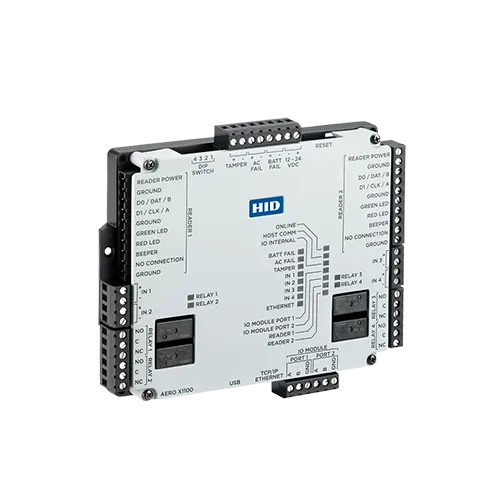
Enterprise Controllers
For multi-door sites, secure areas and expandable access control designs.
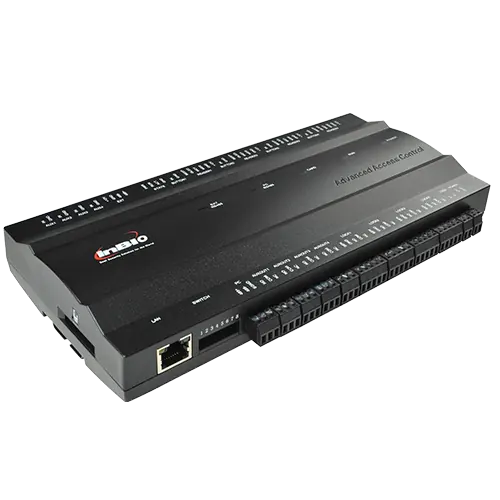
Biometric Panels
For fingerprint and card-based systems with access rules and reports.
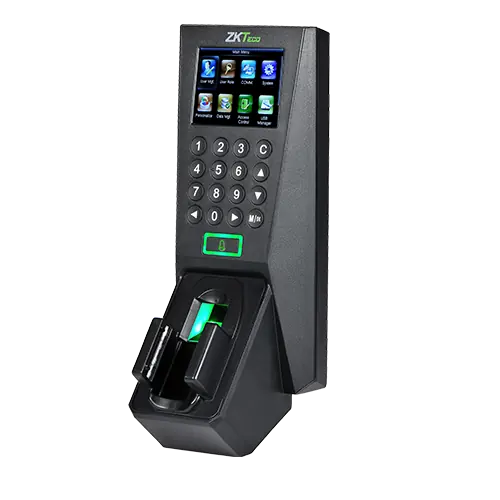
Door Terminals
For offices, staff entrances and standalone controlled doors.
Choosing the right access control setup
Good access control is not only about buying a reader. It depends on the door type, user volume, power backup, audit needs, visitor flow and whether the site needs integration with CCTV or alarms.

| Site Need | Good Fit | Why It Helps |
|---|---|---|
| High-security doors | OSDP readers with controller monitoring | Encrypted communication and better tamper detection. |
| Busy staff entrances | RFID, MIFARE or mobile credentials | Fast movement without slowing down the entrance. |
| Attendance and payroll support | Biometric terminals | Helps verify the person using the credential. |
| Existing older cabling | Wiegand assessment or OSDP upgrade plan | Keeps useful infrastructure where practical while improving security. |
| Multi-site organisations | Networked or cloud-managed access control | Central user control, reports and remote credential changes. |
Where Access Control Helps Most
The same technology can be designed differently depending on the building, users and security risk.
Offices & Corporate Sites
Control reception, server rooms, finance offices, records rooms and staff-only areas.
Schools & Universities
Secure administration blocks, labs, libraries, dormitories and campus entry points.
Banks & Finance
Apply stronger access rules for cash rooms, back offices, vault zones and audit-sensitive areas.
Why Choose Keystone Technologies?
- Lusaka access control installer: Trusted for offices, schools, banks, estates and secure facilities.
- Certified technical support: We design, install and maintain modern access control systems.
- Top brands: We support OSDP, Wiegand, MIFARE, RFID and biometric access technologies.
- Custom solutions: From single-door offices to large multi-site enterprises.
- Local presence: Faster installation, troubleshooting and support across Zambia.

Ready to Secure Your Property?
Contact Keystone Technologies for an access control plan for your office, school, estate, bank, warehouse or secure facility.
Call: +260 953 070 258 | Email: info@keystonetechltd.com